Choosing Pixie Script: A Web Designer’s Take on Using a Cute Handwritten Font
Testing the Font in a Real Layout
I was working on a landing page for a wellness coach’s new online course. The brand needed a warm, approachable feel—something that felt personal but still professional. I started by testing Pixie Script in the hero section. The font immediately stood out with its soft, cursive strokes and gentle bounce. It gave the headline a handwritten charm that matched the brand’s tone perfectly. But could it hold up in a real web layout?
Visual Style and Digital Personality
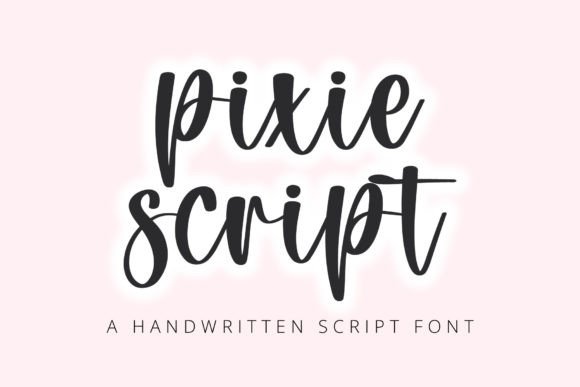
Pixie Script is a script font with a sweet, playful character. Its flowing lines and subtle variation in stroke weight make it feel both modern and nostalgic. It’s the kind of typeface that works well for brands aiming to feel personable, creative, or artisanal. I found it especially effective when used sparingly in digital layouts—ideal for headlines, logo text, or short calls to action.
Where to Use Pixie Script Online
This font shines in web design when used for:
- Hero headlines on landing pages
- Call-to-action buttons on course sales pages
- Logo or brand name display on portfolio sites
- Featured quotes or testimonials
- Social media graphics and blog headers
On a recent boutique online store project, I used Pixie Script for the main banner text. It added a personal touch that helped the brand stand out without competing with product photos. The key is to balance its decorative nature with clean supporting typography.
Readability and UX Considerations
Like any script font, Pixie Script works best at larger sizes. I found it readable on desktop at 24px and above, but on mobile, I limited its use to titles and short phrases. When placing it over image banners, I added a subtle background overlay to ensure contrast. It’s not ideal for long body text or small interface elements like form labels or navigation menus.
Font Pairing Tips for Web Design
To keep the layout balanced, I paired Pixie Script with a clean sans serif like Montserrat or Open Sans. This combination worked well for a coaching website I designed—Pixie Script gave the brand name a warm, inviting feel, while the sans serif kept the rest of the content crisp and easy to scan.
If you’re going for a more editorial or luxury look, try pairing it with a serif font like Playfair Display. The contrast between the elegant script and structured serif creates a strong visual hierarchy that guides users through the page.
Checking Webfont Performance
Before finalizing the font, I checked the available webfont formats and found that Pixie Script came in WOFF and TTF, which are standard for most modern browsers. I made sure to load only the necessary weights to keep the site fast. The font includes several alternate characters, which I used to tweak the look of key headlines for better spacing and visual balance.
Brand Consistency and Professionalism
Using Pixie Script helped the client’s brand feel more human and less corporate. I made sure to apply it consistently across the homepage, logo lockups, and social media templates. It became a key part of their digital identity, showing up in email headers, course landing pages, and even downloadable PDFs.
For a creative business owner or small brand, a font like Pixie Script can be a powerful tool. But it needs to be used with intention. I recommend setting clear usage guidelines—where to use it, what sizes work best, and which fonts to pair it with—to maintain a cohesive look across all digital assets.
Real-World Examples
Here’s where I’ve seen Pixie Script work well:
- A creative portfolio site where the font was used for the artist’s signature and featured project titles
- An online boutique selling handmade goods, where the font gave the banner text a warm, personal feel
- A course sales page where the font added a touch of elegance to the main headline and key benefits
In each case, the font helped reinforce the brand’s personality without hurting readability or usability. It was especially effective when used as a decorative accent rather than the main body font.
Final Thoughts on Font Licensing and Availability
Before using Pixie Script on a client site or product template, I always double-check the licensing. It’s important to confirm whether the font includes commercial use rights, especially for webfonts. I also check if it supports multiple languages and special characters, just in case the site will be translated or used internationally.
Overall, Pixie Script is a solid choice for web designers looking to add a touch of charm and personality to a digital brand. When used thoughtfully, it can elevate the visual appeal of a website without compromising usability or loading performance.